
Templates, Claims & Instances
Three resources, one per job:
| Resource | Who writes it | What it is |
|---|---|---|
DployTemplate | you | a catalog entry: which chart, how it is configured, how long it lives |
DployInstanceClaim | the API, or you with kubectl | a request for one environment of a template |
DployInstance | the operator | the environment itself, reconciled into Flux resources |
Launching an environment means writing a claim. The operator binds it — handing over a warm pool member or provisioning an instance on demand — and projects the instance’s state back onto the claim, so a caller only ever watches the object it created.
DployTemplate
Section titled “DployTemplate”A DployTemplate is a catalog entry: a Helm chart plus how it should be instantiated.
apiVersion: dploy.dev/v1alpha1kind: DployTemplatemetadata:  name: webterm  namespace: dploy-systemspec:  displayName: "Web Terminal"  description: "Browser-based shell for students"  icon: terminal  category: "learning,linux"  enabled: true  visible: true                  # hidden templates stay runnable by name
  method: on-demand              # or "pool"
  chart:    type: git                    # "git" or "helm"    repoURL: https://github.com/AYDEV-FR/dploy-charts    path: charts/webterm         # chart path (git) — for helm, use `chart:`    targetRevision: main         # branch/tag (git) or version (helm)
  valuesTemplate: |    ingress:      enabled: true      host: "{{ .Host }}"    user: "{{ .Owner }}"
  ttl:    seconds: 86400               # -1 = unlimited    extendSeconds: 7200    maxExtends: 5
  parameters:    - name: shell      description: "Login shell"      default: "/bin/bash"
Fields
Section titled “Fields”| Field | Description |
|---|---|
displayName / description / icon / category | UI metadata (category format: "category,subcategory") |
enabled | Gates whether instances may be created (default true) |
visible | Show in listings (default true). Hidden templates remain runnable via /run/{name} |
ownerClaim | JWT claim that identifies the owner (primary key) — see Ownership. Empty = the API’s username claim |
method | on-demand (one fresh instance per request) or pool (pre-warmed) |
pool | Pool settings — see below (required for method: pool) |
engine | Override OperatorConfig.defaultEngine (currently flux) |
chart | Chart source — see below |
valuesTemplate | Go template rendered to Helm values YAML |
valueFiles | Values file paths within the chart repository |
connectionURLTemplate | Override the cluster-wide URL template |
ttl | seconds (-1 = unlimited), extendSeconds, maxExtends |
maxInstancesPerUser | Per-template quota override |
parameters | Request-supplied params (exposed as .Params) |
Ownership
Section titled “Ownership”ownerClaim chooses which JWT claim is the owner — the primary key Dploy uses for the owner
label, per-owner quota, instance naming, and listing. This makes a template either personal or
team-shared:
# Per-user: each user gets their own instancespec: ownerClaim: preferred_username# Per-team: everyone in the group shares one instance and one quotaspec: ownerClaim: groups- The claim value is sanitized (lowercased,
[a-z0-9-], ≤63 chars). Multi-valued claims (e.g.groups) use their first value when an instance is created. - The quota applies per owner key — a team has its own allowance, independent of each member’s personal quota.
/run/{env}returns the owner’s existing instance, so a teammate launching the same group-owned template reuses the running environment instead of creating a new one.GET /api/environmentslists everything you own across all your identities — your username plus every group you belong to.- An empty
ownerClaimfalls back to the API’s configured username claim (JWT_USERNAME_CLAIM).
Chart sources
Section titled “Chart sources”Dploy is engine-neutral about where charts come from, and maps them onto Flux:
# Git repository (the chart lives at a path in the repo)chart: type: git repoURL: https://github.com/AYDEV-FR/dploy-charts path: charts/vscode targetRevision: main # branch or tag# Helm repositorychart: type: helm repoURL: https://charts.bitnami.com/bitnami chart: postgresql targetRevision: "15.5.0" # chart version# OCI Helm registry (a HelmRepository of type "oci")chart: type: helm repoURL: oci://ghcr.io/aydev-fr/charts chart: jupyter targetRevision: "1.2.3"Warm pools
Section titled “Warm pools”With method: pool, the DployTemplate controller keeps a set of pre-deployed, unclaimed
instances so users get an environment instantly:
spec: method: pool pool: size: 3 # warm, idle instances to keep available maxSize: 10 # cap on total instances (0 = unlimited) recycle: true # replace an instance after it is releasedWhen a claim arrives for a pool template, the operator binds one Available instance to it — the
owner and the TTL clock are stamped at that moment. The DployTemplate controller then provisions a
replacement to refill the pool.
If no warm instance is free, spec.waitForPool decides: true (the API’s default) parks the claim
as Pending until one frees up, false provisions a dedicated instance on demand instead.
maxSize caps every instance of the template, idle and claimed, and it binds both paths that
create one: the pool refill and the on-demand fallback above. A claim that would have to provision
past the cap waits as Pending with TemplateAtCapacity and binds on its own once a slot opens —
it is not refused, because nothing about the claim is wrong and the condition is one the claimant
cannot act on. Taking a warm member is never gated: it hands out an environment that already counts.
Note the interaction: with maxSize equal to size, every slot is a pool slot, so
waitForPool: false has nowhere to fall back to and behaves like true. Leave headroom above
size if you want on-demand instances alongside a warm pool.
Concurrent claims each pass the check before any of their instances exist, so the cap is settled after the fact as well as before, on the same rule the per-owner quota uses: the oldest instances keep their slots, and a claim that overshot gives its environment back. The rule is stable, so once every create is visible all claims agree on who lost.
size is a target, not a floor: lowering it reclaims the members that are now surplus, and
size: 0 drains the warm set entirely. The purge only ever takes from unclaimed members — a
claimed environment is never destroyed to satisfy a size change, and a claim that lands while the
purge is running wins the race. Surplus members are picked least-useful-first (failed, then still
provisioning, then Available), keeping the oldest warm instances since those have been healthy
longest.
Deleting a template takes its environments with it, claimed ones included: a claim whose template
disappears becomes Rejected, and rejecting releases the instance it was holding. Without that the
instance — owner-referenced to the claim rather than the template — would sit Failed with its
workload namespace and pods still running until someone deleted it by hand.
Two cases behave differently on purpose:
- A disabled template keeps its warm set. Disabling is usually temporary, and draining would make re-enabling pay the full provisioning cost again.
- Switching
methodaway frompooldrains it. Warm members are only ever handed out formethod: pool, so members left behind by a method switch could never be claimed by anyone.
Connection URLs
Section titled “Connection URLs”The instance URL is resolved with this precedence:
DployTemplate.spec.connectionURLTemplateOperatorConfig.spec.connectionURLTemplate- fallback
https://<name>-<uuid>.<baseDomain>(the bare.Host)
spec: connectionURLTemplate: "https://{{ .Owner }}-{{ .UUID }}.lab.example.com"Values templating
Section titled “Values templating”valuesTemplate is rendered with Go text/template + sprig against the instance context
(.Owner, .UUID, .Host, .URL, .Params, .Config.Values, …). The
result is parsed as YAML and handed to the HelmRelease.
valuesTemplate: | workspaceName: "{{ .Owner }}-workspace" sessionId: "{{ .UUID }}" email: "{{ .Params.email }}" ingress: host: "{{ .Host }}" {{- if eq .Params.size "large" }} resources: limits: { cpu: "2", memory: 4Gi } {{- end }}DployInstanceClaim
Section titled “DployInstanceClaim”A claim is a request for one environment. It is the only dploy resource the API writes, and the only one you need to write by hand to drive the operator.
apiVersion: dploy.dev/v1alpha1kind: DployInstanceClaimmetadata: name: john-doe-webterm # conventionally <owner>-<template>: one claim per pair namespace: dploy-systemspec: templateRef: webterm owner: john-doe # the identity key: quota, listing and naming all use it waitForPool: true # empty pool → wait, rather than provision on demand params: # request params + the forwarded JWT claims, seen as .Params shell: /bin/zsh email: john@example.com ttlSeconds: 0 # 0 = the template's default; raise it to extendstatus: phase: Bound instanceRef: webterm-pool-x9k2 uuid: a1b2c3d4 connectionURL: https://webterm-a1b2c3d4.env.dploy.dev connectionType: web instancePhase: Claimed health: Healthy boundAt: "2026-01-14T16:00:00Z" # the TTL anchor expiresAt: "2026-01-15T16:00:00Z" # boundAt + ttlSeconds ttlSeconds: 86400 # granted, after clamping maxTTLSeconds: 100800 # ceiling spec.ttlSeconds may be raised toClaim phases
Section titled “Claim phases”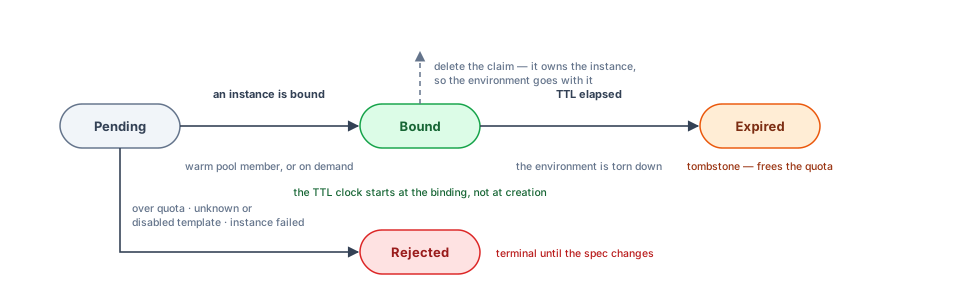
| Phase | Meaning |
|---|---|
Pending | Accepted, not holding an environment yet — waiting for a warm instance, or for the template to drop below maxSize |
Bound | An instance is bound and owned by the claim; status mirrors it |
Rejected | Unsatisfiable as written (quota exceeded, unknown or disabled template, the bound environment failed). Terminal until the spec changes |
Expired | The environment outlived its TTL and was torn down. The claim survives as a tombstone and no longer counts against the quota |
The Bound condition carries the reason and a human-readable message — why a claim is waiting, or
why it was refused. The Ready condition mirrors the bound instance’s readiness.
TTL and extensions
Section titled “TTL and extensions”The clock starts when the claim binds, not when it is created, so time spent queueing for a warm instance costs nothing. Extending is a patch, not a verb:
kubectl patch dclaim john-doe-webterm --type=merge -p '{"spec":{"ttlSeconds":100800}}'The operator clamps the result to status.maxTTLSeconds — the template’s base TTL plus its full
extend budget (ttl.maxExtends × ttl.extendSeconds) — and reports what it actually granted in
status.ttlSeconds. -1 means unlimited, and is only honored where the template is itself
unlimited.
Teardown
Section titled “Teardown”The claim owns the instance it binds, so deleting the claim cascades:
kubectl delete dclaim john-doe-webtermThe instance’s finalizer then removes the HelmRelease and the workload namespace. For a pool
template, the DployTemplate controller provisions a fresh warm member to take its place.
DployInstance
Section titled “DployInstance”A DployInstance is one deployed (or pooled) environment. The operator creates it — from a claim,
or as a warm pool member — and owns its status. You rarely write one by hand.
apiVersion: dploy.dev/v1alpha1kind: DployInstancemetadata: name: john-doe-webterm namespace: dploy-system labels: dploy.dev/owner: john-doe dploy.dev/template: webterm dploy.dev/claim: john-doe-webterm # the claim holding it dploy.dev/claim-uid: 3f2b1c9a-… # the binding itself annotations: dploy.dev/bound-at: "2026-01-14T16:00:00Z" ownerReferences: # the claim owns it → delete cascades - apiVersion: dploy.dev/v1alpha1 kind: DployInstanceClaim name: john-doe-webterm controller: truespec: templateRef: webterm owner: john-doe params: shell: /bin/zsh ttlSeconds: 86400 expiresAt: "2026-01-15T16:00:00Z"status: phase: Ready uuid: a1b2c3d4 namespace: john-doe-webterm-a1b2c3d4 url: https://john-doe-a1b2c3d4.env.dploy.dev engine: flux engineRef: john-doe-webterm health: Healthy expiresAt: "2026-01-15T16:00:00Z"Instance phases
Section titled “Instance phases”| Phase | Meaning |
|---|---|
Pending | Accepted, not yet reconciled |
Provisioning | Flux is installing the release — or the template has not yet proven its chart resolves, in which case no HelmRelease is applied at all |
Ready | On-demand instance healthy and reachable |
Available | Warm pool member, unclaimed |
Claimed | Pool member handed to a user |
Expiring | Past TTL, being torn down |
Failed | Provisioning or reconciliation failed |
Suggested icon identifiers for the web UI:
| Icon ID | Use case |
|---|---|
terminal | Terminals, shells |
desktop | VNC / desktop |
code | IDEs, editors |
book | Notebooks, docs |
database | Databases |
box | Generic containers |
web | Web apps |
default | Fallback |
Chart requirements
Section titled “Chart requirements”Your chart receives whatever your valuesTemplate renders — there are no implicitly-injected
values. Expose a configurable ingress host (or whichever fields your template sets) so each
instance gets its unique URL, for example:
# templates/ingress.yaml (in your chart)spec: rules: - host: {{ .Values.ingress.host | quote }} http: paths: - path: / pathType: Prefix backend: service: name: {{ include "chart.fullname" . }} port: { number: 80 }See TLS Certificates for wildcard-certificate strategies that keep per-environment hostnames out of Certificate Transparency logs.