
ExternalDNS (bare metal)
Every Dploy environment is reachable at <name>-<uuid>.<baseDomain> (the operator’s
.Host, e.g. vscode-a1b2c3d4.env.dploy.dev). Those hostnames are created and destroyed
on the fly, so a static DNS zone is impractical — each environment needs a record published the
moment its Ingress/HTTPRoute appears and removed when the instance expires.
On a managed cloud this is trivial (cloud DNS + cloud LoadBalancer). On bare metal you own both halves: there is no cloud load balancer to hand out an IP, and no cloud DNS API to publish records. This guide wires the self-hosted equivalent:
- MetalLB (L2 advertisement) — gives your Ingress/Gateway controller a real LoadBalancer IP on the LAN.
- ExternalDNS — watches
Ingress/HTTPRoute/Serviceobjects and publishes the corresponding records. - etcd + CoreDNS — the DNS backend ExternalDNS writes to (etcd) and the authoritative
resolver that serves the zone (CoreDNS via its
etcdplugin).
How it fits together
Section titled “How it fits together”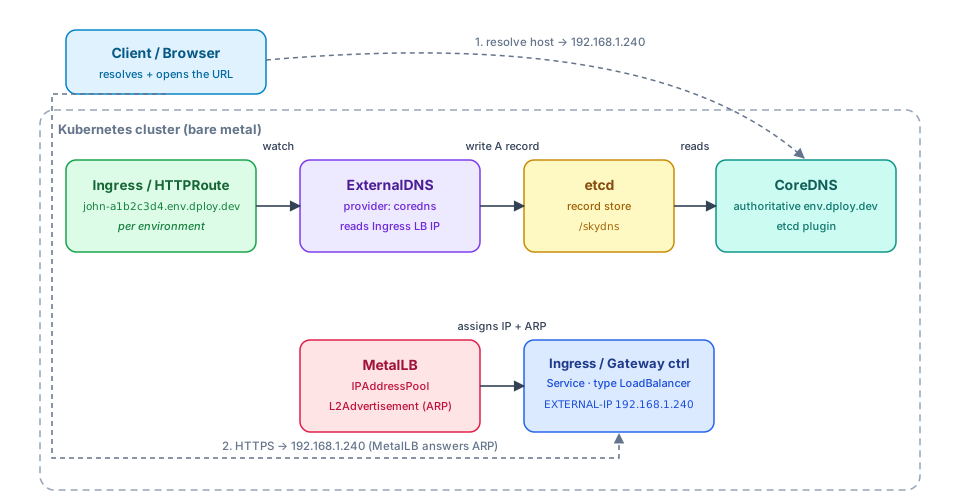
The four components form a single chain, from environment creation to a resolvable hostname:
- The operator renders an Ingress/
HTTPRoutefor the instance with hostvscode-a1b2c3d4.env.dploy.dev. - ExternalDNS watches those objects, reads the LoadBalancer IP that MetalLB assigned to
the ingress controller’s
Service, and writes a matching A record into etcd. - CoreDNS is authoritative for
env.dploy.devand serves that record straight from etcd. - A client resolves the host to the MetalLB pool IP; MetalLB answers ARP for it (L2Advertisement), so traffic lands on the ingress controller.
Prerequisites
Section titled “Prerequisites”- A bare-metal cluster with a free range of LAN IPs MetalLB can own.
- An Ingress or Gateway API controller (see TLS Certificates).
- The parent zone (
dploy.dev) able to delegateenv.dploy.devto your CoreDNS, or internal resolvers you can point at it.
1. MetalLB — LoadBalancer IPs via L2
Section titled “1. MetalLB — LoadBalancer IPs via L2”helm repo add metallb https://metallb.github.io/metallbhelm repo updatehelm install metallb metallb/metallb \ --namespace metallb-system --create-namespacekubectl -n metallb-system rollout status deploy/metallb-controllerDeclare an address pool and advertise it.
Best for a single L3 subnet — nodes answer ARP for the pool IPs, no router config needed.
apiVersion: metallb.io/v1beta1kind: IPAddressPoolmetadata: name: dploy-pool namespace: metallb-systemspec: addresses: - 192.168.1.240-192.168.1.250---apiVersion: metallb.io/v1beta1kind: L2Advertisementmetadata: name: dploy-l2 namespace: metallb-systemspec: ipAddressPools: - dploy-poolFor multi-subnet / routed setups, peer MetalLB with your router instead of L2.
apiVersion: metallb.io/v1beta1kind: BGPPeermetadata: name: router namespace: metallb-systemspec: myASN: 64512 peerASN: 64512 peerAddress: 192.168.1.1---apiVersion: metallb.io/v1beta1kind: BGPAdvertisementmetadata: name: dploy-bgp namespace: metallb-systemspec: ipAddressPools: - dploy-poolYour ingress controller’s Service (type LoadBalancer) now gets an IP from dploy-pool. Note
it — ExternalDNS will publish it for you:
kubectl get svc -A -o wide | grep LoadBalancer2. etcd — record store for CoreDNS
Section titled “2. etcd — record store for CoreDNS”ExternalDNS’s coredns provider doesn’t talk to CoreDNS directly; it writes records into etcd,
which CoreDNS reads through its etcd plugin. Deploy a small, dedicated etcd (not the cluster’s
control-plane etcd):
helm repo add bitnami https://charts.bitnami.com/bitnamihelm repo updatehelm install etcd bitnami/etcd \ --namespace external-dns --create-namespace \ --set auth.rbac.create=false \ --set replicaCount=1This exposes etcd.external-dns.svc.cluster.local:2379.
3. CoreDNS — authoritative resolver for the zone
Section titled “3. CoreDNS — authoritative resolver for the zone”Run a second CoreDNS (separate from kube-system’s cluster DNS) that is authoritative for
env.dploy.dev, reads records from etcd, and is exposed on a MetalLB IP so external/upstream
resolvers can reach it.
serviceType: LoadBalancerservers: - zones: - zone: env.dploy.dev. port: 53 plugins: - name: errors - name: health - name: ready - name: etcd parameters: env.dploy.dev configBlock: |- path /skydns endpoint http://etcd.external-dns.svc.cluster.local:2379 - name: cache parameters: 30 - name: loadbalance - zones: - zone: . port: 53 plugins: - name: errors - name: forward parameters: . /etc/resolv.conf - name: cache parameters: 30helm repo add coredns https://coredns.github.io/helmhelm repo updatehelm install dns-public coredns/coredns \ --namespace external-dns \ -f coredns-values.yamlkubectl -n external-dns get svc dns-public-coredns -o wide # note the MetalLB IP4. ExternalDNS — publish environment records
Section titled “4. ExternalDNS — publish environment records”Install ExternalDNS with the coredns provider, pointed at the same etcd, and scoped to the
environment zone.
helm repo add external-dns https://kubernetes-sigs.github.io/external-dns/helm repo updatehelm install external-dns external-dns/external-dns \ --namespace external-dns \ --set provider=coredns \ --set 'env[0].name=ETCD_URLS' \ --set 'env[0].value=http://etcd.external-dns.svc.cluster.local:2379' \ --set 'sources={ingress,service}' \ --set 'domainFilters={env.dploy.dev}' \ --set policy=syncIf environments expose an HTTPRoute instead of an Ingress (the recommended Dploy path), use
the gateway-httproute source. The chart grants the needed gateway.networking.k8s.io read RBAC
automatically.
helm install external-dns external-dns/external-dns \ --namespace external-dns \ --set provider=coredns \ --set 'env[0].name=ETCD_URLS' \ --set 'env[0].value=http://etcd.external-dns.svc.cluster.local:2379' \ --set 'sources={gateway-httproute}' \ --set 'domainFilters={env.dploy.dev}' \ --set policy=syncpolicy=sync lets ExternalDNS delete records when an environment (and its Ingress/HTTPRoute)
is torn down — which is exactly what you want for ephemeral environments. Use upsert-only if you
prefer to never delete records automatically.
5. Tie it back to Dploy
Section titled “5. Tie it back to Dploy”Nothing extra is required on the Dploy side — the per-instance Ingress/HTTPRoute rendered from
your template already carries host: {{ .Host }}, which ExternalDNS keys off of. The end
result:
- A user launches an environment → operator renders an Ingress/
HTTPRoutewith hostvscode-a1b2c3d4.env.dploy.dev. - MetalLB has already assigned the ingress controller a LoadBalancer IP; ExternalDNS reads it from the object’s status.
- ExternalDNS writes the A record into etcd; CoreDNS serves
vscode-a1b2c3d4.env.dploy.dev. - The wildcard
*.env.dploy.devcertificate covers TLS for the new host with no per-environment issuance.
Delegate the zone
Section titled “Delegate the zone”Point real clients at CoreDNS by delegating env.dploy.dev from the parent zone to the CoreDNS
MetalLB IP (or pointing internal resolvers at it):
; in the dploy.dev zoneenv.dploy.dev. IN NS ns-dploy.dploy.dev.ns-dploy.dploy.dev. IN A 192.168.1.241 ; CoreDNS LoadBalancer IPVerification & troubleshooting
Section titled “Verification & troubleshooting”# ExternalDNS is reconciling and sees your hostskubectl -n external-dns logs deploy/external-dns
# Records actually landed in etcdkubectl -n external-dns exec -it statefulset/etcd -- \ etcdctl get --prefix /skydns
# CoreDNS answers from the zone (use its MetalLB IP)dig @192.168.1.241 vscode-a1b2c3d4.env.dploy.dev +short
# MetalLB assigned the ingress controller an IPkubectl get svc -A | grep LoadBalancerkubectl -n metallb-system logs -l app.kubernetes.io/component=speaker| Symptom | Likely cause |
|---|---|
| Record never created | domainFilters doesn’t match the host; wrong sources; Ingress has no host |
Record created but dig fails | etcd path ≠ ExternalDNS COREDNS_PREFIX; querying the wrong IP |
| Resolves but unreachable | MetalLB pool overlaps the LAN/DHCP range, or L2 speaker not on the node holding the IP |
| Stale records after teardown | policy set to upsert-only instead of sync |