
TLS Certificates
This guide covers TLS for Dploy environments, the security trade-offs, and two recommended approaches: Ingress with a wildcard certificate and Gateway API.
Security considerations
Section titled “Security considerations”Individual certificates per environment
Section titled “Individual certificates per environment”Issuing a certificate per environment hostname (e.g. john-abc12345.env.dploy.dev) is
problematic:
- Let’s Encrypt rate limits — 50 certs/registered-domain/week, 5 duplicates/week, 300 orders/account/3h. Dynamic environments hit these quickly.
- Certificate Transparency logs — every issued hostname is public (e.g. via crt.sh), leaking subdomains and user activity.
Wildcard certificates
Section titled “Wildcard certificates”A wildcard (*.env.dploy.dev) solves both:
- One certificate covers every environment; no rate-limit pressure.
- Privacy — individual hostnames never appear in CT logs.
Trade-offs to manage:
- Broader blast radius if the private key is compromised.
- Requires a DNS-01 challenge (HTTP-01 can’t issue wildcards), so cert-manager needs DNS API credentials.
Mitigations: scope the wildcard to a dedicated subdomain, keep validity short, store the key in a restricted namespace, and monitor issuance.
Prerequisites
Section titled “Prerequisites”- cert-manager installed
- DNS provider API credentials for the DNS-01 challenge
- An Ingress or Gateway API controller
Install cert-manager
Section titled “Install cert-manager”helm repo add jetstack https://charts.jetstack.iohelm repo update
helm install cert-manager jetstack/cert-manager \ --namespace cert-manager --create-namespace \ --set crds.enabled=trueClusterIssuer (DNS-01)
Section titled “ClusterIssuer (DNS-01)”apiVersion: v1kind: Secretmetadata: name: cloudflare-api-token namespace: cert-managertype: OpaquestringData: api-token: "your-cloudflare-api-token"---apiVersion: cert-manager.io/v1kind: ClusterIssuermetadata: name: letsencrypt-prodspec: acme: server: https://acme-v02.api.letsencrypt.org/directory email: admin@dploy.dev privateKeySecretRef: name: letsencrypt-prod-account solvers: - dns01: cloudflare: apiTokenSecretRef: name: cloudflare-api-token key: api-token selector: dnsZones: - "dploy.dev"apiVersion: cert-manager.io/v1kind: ClusterIssuermetadata: name: letsencrypt-prodspec: acme: server: https://acme-v02.api.letsencrypt.org/directory email: admin@dploy.dev privateKeySecretRef: name: letsencrypt-prod-account solvers: - dns01: route53: region: eu-west-1 # Use IRSA (recommended) or accessKeyIDSecretRef/secretAccessKeySecretRef# Requires the OVH webhook: https://github.com/baarde/cert-manager-webhook-ovhapiVersion: cert-manager.io/v1kind: ClusterIssuermetadata: name: letsencrypt-prodspec: acme: server: https://acme-v02.api.letsencrypt.org/directory email: admin@dploy.dev privateKeySecretRef: name: letsencrypt-prod-account solvers: - dns01: webhook: groupName: acme.dploy.dev solverName: ovh config: endpoint: ovh-eu applicationSecretRef: name: ovh-credentials key: application-secret consumerKeySecretRef: name: ovh-credentials key: consumer-keyOption 1 — Ingress with a wildcard certificate
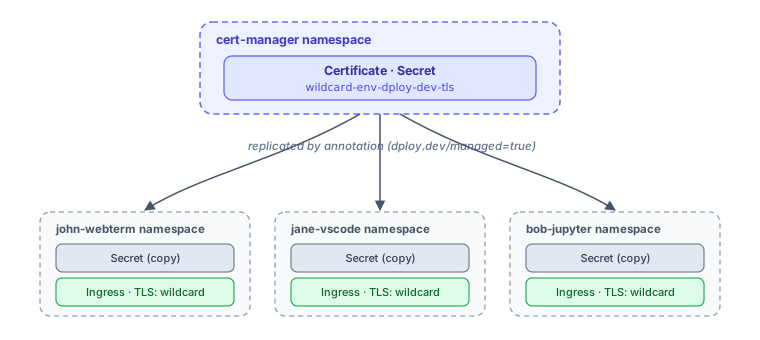
Section titled “Option 1 — Ingress with a wildcard certificate”Uses traditional Ingress resources with the wildcard secret replicated into each environment namespace.
1. Install kubernetes-replicator
Section titled “1. Install kubernetes-replicator”kubernetes-replicator copies secrets across namespaces by annotation.
helm repo add mittwald https://helm.mittwald.dehelm repo updatehelm install kubernetes-replicator mittwald/kubernetes-replicator --namespace kube-system2. Wildcard certificate
Section titled “2. Wildcard certificate”apiVersion: cert-manager.io/v1kind: Certificatemetadata: name: wildcard-env-dploy-dev namespace: cert-managerspec: secretName: wildcard-env-dploy-dev-tls issuerRef: name: letsencrypt-prod kind: ClusterIssuer dnsNames: - "*.env.dploy.dev" secretTemplate: annotations: replicator.v1.mittwald.de/replicate-to-matching: > dploy.dev/managed=true3. Environment chart Ingress
Section titled “3. Environment chart Ingress”Reference the replicated secret from your chart’s Ingress (set ingress.host from your
valuesTemplate):
apiVersion: networking.k8s.io/v1kind: Ingressmetadata: name: {{ .Release.Name }}spec: ingressClassName: nginx tls: - hosts: - {{ .Values.ingress.host | quote }} secretName: wildcard-env-dploy-dev-tls rules: - host: {{ .Values.ingress.host | quote }} http: paths: - path: / pathType: Prefix backend: service: name: {{ .Release.Name }} port: { number: 80 }Option 2 — Gateway API (recommended)
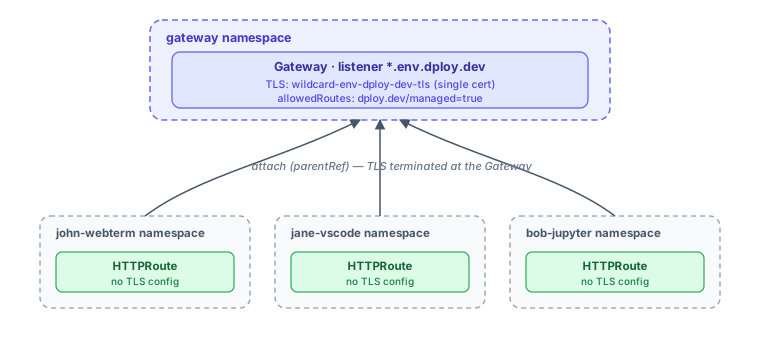
Section titled “Option 2 — Gateway API (recommended)”TLS terminates centrally at a Gateway, so the certificate lives in one namespace and
environments only need an HTTPRoute (no per-namespace secret copies).
| Aspect | Ingress + Replicator | Gateway API |
|---|---|---|
| Certificate location | Replicated to N namespaces | Single namespace |
| Secret exposure | Every environment namespace | Isolated in gateway namespace |
| Dependency | kubernetes-replicator | Native Kubernetes |
| Access control | RBAC on secrets | allowedRoutes selector |
1. Install the Gateway API CRDs
Section titled “1. Install the Gateway API CRDs”kubectl apply -f https://github.com/kubernetes-sigs/gateway-api/releases/download/v1.2.0/standard-install.yaml2. Install a Gateway controller
Section titled “2. Install a Gateway controller”helm repo add traefik https://traefik.github.io/chartshelm repo updatehelm install traefik traefik/traefik \ --namespace traefik-system --create-namespace \ --set "providers.kubernetesGateway.enabled=true" \ --set "gateway.enabled=false"Traefik creates a traefik GatewayClass — verify with kubectl get gatewayclass traefik.
helm repo add cilium https://helm.cilium.iohelm repo updatehelm upgrade cilium cilium/cilium --namespace kube-system \ --reuse-values --set gatewayAPI.enabled=trueCilium creates a cilium GatewayClass. Cilium Gateway API needs kubeProxyReplacement=true.
3. Certificate (same namespace as the Gateway)
Section titled “3. Certificate (same namespace as the Gateway)”apiVersion: cert-manager.io/v1kind: Certificatemetadata: name: wildcard-env-dploy-dev namespace: traefik-system # or your gateway namespacespec: secretName: wildcard-env-dploy-dev-tls issuerRef: name: letsencrypt-prod kind: ClusterIssuer dnsNames: - "*.env.dploy.dev"4. Gateway
Section titled “4. Gateway”apiVersion: gateway.networking.k8s.io/v1kind: Gatewaymetadata: name: dploy-gateway namespace: traefik-systemspec: gatewayClassName: traefik # or cilium listeners: - name: https-envs hostname: "*.env.dploy.dev" port: 443 protocol: HTTPS tls: mode: Terminate certificateRefs: - name: wildcard-env-dploy-dev-tls kind: Secret allowedRoutes: namespaces: from: Selector selector: matchLabels: dploy.dev/managed: "true"5. Environment chart HTTPRoute
Section titled “5. Environment chart HTTPRoute”The HTTPRoute needs no TLS config — the Gateway terminates TLS:
apiVersion: gateway.networking.k8s.io/v1kind: HTTPRoutemetadata: name: {{ .Release.Name }} namespace: {{ .Release.Namespace }}spec: parentRefs: - name: dploy-gateway namespace: traefik-system hostnames: - {{ .Values.ingress.host | quote }} rules: - matches: - path: type: PathPrefix value: / backendRefs: - name: {{ .Release.Name }} port: 806. ReferenceGrant (if required)
Section titled “6. ReferenceGrant (if required)”Some implementations need explicit cross-namespace permission:
apiVersion: gateway.networking.k8s.io/v1beta1kind: ReferenceGrantmetadata: name: allow-dploy-routes namespace: traefik-systemspec: from: - group: gateway.networking.k8s.io kind: HTTPRoute namespace: "*" to: - group: "" kind: Service - group: gateway.networking.k8s.io kind: GatewayTroubleshooting
Section titled “Troubleshooting”# Certificate not issuedkubectl describe certificate wildcard-env-dploy-dev -n cert-managerkubectl get challenges,orders -Akubectl logs -n cert-manager -l app=cert-manager
# Secret not replicated (Ingress approach)kubectl logs -n kube-system -l app.kubernetes.io/name=kubernetes-replicatorkubectl get ns -l dploy.dev/managed=true
# Gateway / HTTPRoutekubectl describe gateway dploy-gateway -n traefik-systemkubectl describe httproute <name> -n <namespace>