
Security Considerations
Dploy runs user-selected workloads — whatever chart a DployTemplate points at — inside
short-lived, per-tenant namespaces. That makes the runtime boundary a first-class security
concern: a malicious or vulnerable environment shouldn’t be able to reach the node or another
user’s environment.
Two boundaries, two mechanisms
Section titled “Two boundaries, two mechanisms”Dploy already hardens the control plane: the API and operator are split across two service accounts so a compromised API can only create instance requests, never arbitrary workloads (see Architecture → The RBAC boundary).
What that split does not cover is the workload itself. Environments run as ordinary containers, which share the host kernel. A container escape (kernel exploit, misconfigured capability, runtime CVE) lands an attacker on the node — and from there, on every other tenant’s environment. For multi-tenant or untrusted workloads, that shared kernel is the weak point.
Kata Containers closes it by running each pod inside a lightweight VM with its own guest kernel, so the isolation boundary is the hypervisor rather than namespaces + cgroups.
| Threat | Standard runtime (runc) | Kata Containers |
|---|---|---|
| Container → host kernel escape | Shared kernel — high blast radius | Guest kernel only; host kernel not exposed |
| Cross-tenant access after escape | Reachable | Confined to the pod’s VM |
| Kernel CVE exploitation | Hits the host | Hits a throwaway guest |
| Hypervisor / hardware side-channels | n/a | Still possible — not a silver bullet |
Prerequisites
Section titled “Prerequisites”-
Hardware virtualization on the worker nodes (
/dev/kvm). On bare metal this is native; on cloud instances you must enable nested virtualization (e.g. GCPenable-nested-virtualization, Azure/AWS*.metalinstances). -
A CRI that Kata integrates with — containerd or CRI-O.
kata-deployconfigures containerd automatically. -
Verify KVM is present on a node:
Terminal window kubectl debug node/<node> -it --image=busybox -- ls -l /dev/kvm
Install Kata Containers (kata-deploy)
Section titled “Install Kata Containers (kata-deploy)”kata-deploy is a DaemonSet that drops the Kata binaries onto each node, wires up the container
runtime, and registers the RuntimeClass objects.
# RBAC for the installerkubectl apply -f https://raw.githubusercontent.com/kata-containers/kata-containers/main/tools/packaging/kata-deploy/kata-rbac/base/kata-rbac.yaml
# The installer DaemonSet (stable variant)kubectl apply -f https://raw.githubusercontent.com/kata-containers/kata-containers/main/tools/packaging/kata-deploy/kata-deploy/base/kata-deploy-stable.yaml
# Wait for every node to finish installingkubectl -n kube-system rollout status ds/kata-deploykubectl -n kube-system wait --timeout=10m --for=condition=Ready -l name=kata-deploy pod
# Register the RuntimeClasses (kata, kata-qemu, kata-clh, …)kubectl apply -f https://raw.githubusercontent.com/kata-containers/kata-containers/main/tools/packaging/kata-deploy/runtimeclasses/kata-runtimeClasses.yamlConfirm the RuntimeClasses and boot a test pod with its own kernel:
kubectl get runtimeclass            # expect kata-qemu, kata-clh, …
kubectl run kata-test --image=busybox --restart=Never \  --overrides='{"spec":{"runtimeClassName":"kata-qemu"}}' -- uname -rkubectl logs kata-test              # guest kernel, different from `uname -r` on the nodekubectl delete pod kata-test
Apply it to Dploy environments
Section titled “Apply it to Dploy environments”The goal is for every environment pod to run under the Kata RuntimeClass. You have two
options; the enforcement approach is recommended because it doesn’t depend on each chart exposing
a runtimeClassName value.
Dploy labels every workload namespace dploy.dev/managed=true. A policy engine can mutate all
pods in those namespaces to use Kata, regardless of the chart. With
Kyverno:
apiVersion: kyverno.io/v1kind: ClusterPolicymetadata: name: dploy-kata-runtimespec: rules: - name: set-kata-runtime match: any: - resources: kinds: [Pod] namespaceSelector: matchLabels: dploy.dev/managed: "true" mutate: patchStrategicMerge: spec: runtimeClassName: kata-qemuThis is robust: it covers any template, and the boundary is enforced centrally rather than trusted to each chart’s values.
If the chart referenced by a DployTemplate exposes a runtimeClassName value, set it in the
template’s valuesTemplate:
apiVersion: dploy.dev/v1alpha1kind: DployTemplatemetadata: name: webterm namespace: dploy-systemspec: # … valuesTemplate: | runtimeClassName: kata-qemu # … rest of the chart valuesSimple, but only works for charts that thread runtimeClassName into their pod spec — and it must
be repeated per template. Prefer the enforcement approach for untrusted workloads.
Verify a real environment is sandboxed:
NS=$(kubectl get dployinstance <name> -n dploy-system -o jsonpath='{.status.namespace}')kubectl get pod -n "$NS" -o jsonpath='{.items[*].spec.runtimeClassName}' # kata-qemuOperational trade-offs
Section titled “Operational trade-offs”- Overhead — each pod is a microVM: higher memory/CPU baseline and slower cold start than runc. Size templates accordingly and watch warm-pool sizing for pool-method templates.
- Startup latency — VM boot adds seconds; relevant for on-demand environments where users wait on provisioning.
- Feature limits — host-path mounts, some device passthrough, and certain GPU setups need extra configuration or aren’t supported. Validate your heaviest template under Kata before rollout.
Defense in depth, by layer
Section titled “Defense in depth, by layer”Kata isolates the runtime; the layers below bound what an environment can consume, reach, and
persist. They all target the per-environment namespace, which Dploy labels
dploy.dev/managed=true — so propagate them automatically (see Auto-applying to managed
namespaces) rather than hand-applying per namespace.
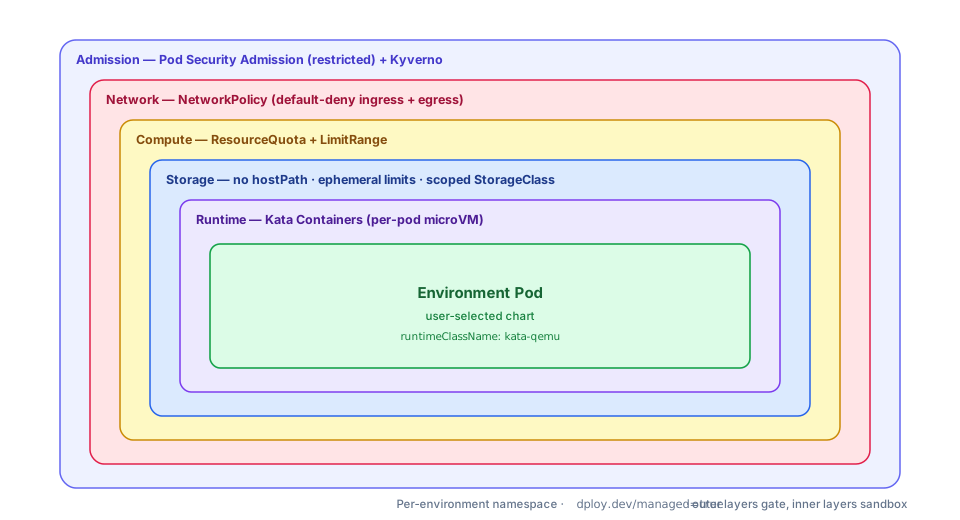
| Layer | Mechanism | Bounds |
|---|---|---|
| Runtime | Kata RuntimeClass | Kernel-level escape |
| Compute | ResourceQuota + LimitRange | CPU/memory/pod/storage exhaustion |
| Network | NetworkPolicy (default-deny) | Lateral movement, metadata/control-plane access |
| Storage | PSA + ephemeral limits + scoped StorageClass | hostPath escape, disk-fill, data bleed |
| Admission | Pod Security Admission restricted + Kyverno | Privileged pods, host namespaces, drift |
Runtime & compute
Section titled “Runtime & compute”Kata (above) is the runtime boundary. Pair it with a ResourceQuota and LimitRange so a single
environment can’t exhaust the node — doubly important under Kata, where each pod carries microVM
overhead.
apiVersion: v1kind: ResourceQuotametadata: name: env-quotaspec: hard: requests.cpu: "2" requests.memory: 4Gi limits.cpu: "4" limits.memory: 8Gi pods: "10" requests.ephemeral-storage: 4Gi limits.ephemeral-storage: 8Gi---apiVersion: v1kind: LimitRangemetadata: name: env-limitsspec: limits: - type: Container default: { cpu: 500m, memory: 512Mi, ephemeral-storage: 1Gi } defaultRequest: { cpu: 100m, memory: 128Mi, ephemeral-storage: 256Mi } max: { cpu: "2", memory: 4Gi }Network
Section titled “Network”Default-deny ingress and egress, then allow only DNS and the ingress/gateway path. This stops a compromised environment from reaching other tenants, in-cluster services, or the cloud metadata endpoint.
apiVersion: networking.k8s.io/v1kind: NetworkPolicymetadata: name: default-denyspec: podSelector: {} policyTypes: [Ingress, Egress]---apiVersion: networking.k8s.io/v1kind: NetworkPolicymetadata: name: allow-dns-and-ingressspec: podSelector: {} policyTypes: [Ingress, Egress] ingress: - from: - namespaceSelector: matchLabels: kubernetes.io/metadata.name: traefik-system # your ingress/gateway ns egress: - to: - namespaceSelector: {} podSelector: matchLabels: k8s-app: kube-dns ports: - { protocol: UDP, port: 53 } - { protocol: TCP, port: 53 }Storage
Section titled “Storage”- No
hostPath— blocked by Pod Security Admissionrestricted(below); it’s the most common path from a volume to the node filesystem. - Ephemeral-storage limits (in the
LimitRangeabove) stop a disk-fill DoS on the node. - Scoped
StorageClasswithreclaimPolicy: Deleteso an environment’s PVs are cleaned up at teardown and never re-bound by another tenant; enable encryption-at-rest at the storage backend. - Under Kata, volumes are surfaced inside the guest VM — never share a
ReadWriteManyvolume across environments, or you reintroduce a cross-tenant channel.
Admission
Section titled “Admission”Enforce Pod Security Admission restricted on managed namespaces — it blocks privileged
containers, host namespaces (hostNetwork/hostPID/hostIPC), hostPath, and running as root:
# labels to add on each managed namespacepod-security.kubernetes.io/enforce: restrictedpod-security.kubernetes.io/enforce-version: latestUse Kyverno for what PSA can’t express — requiring the Kata runtimeClassName (above), mandating
resource limits, or pinning image registries.
Auto-applying to managed namespaces
Section titled “Auto-applying to managed namespaces”ResourceQuota, LimitRange, and NetworkPolicy are namespaced, and Dploy creates namespaces on
the fly. Generate them into every managed namespace with a Kyverno generate policy keyed on the
dploy.dev/managed=true label — the same label the TLS and
ExternalDNS flows rely on:
apiVersion: kyverno.io/v1kind: ClusterPolicymetadata: name: dploy-namespace-hardeningspec: rules: # 1. label the namespace for restricted Pod Security - name: enforce-restricted-psa match: any: - resources: kinds: [Namespace] selector: matchLabels: dploy.dev/managed: "true" mutate: patchStrategicMerge: metadata: labels: pod-security.kubernetes.io/enforce: restricted # 2. drop a default-deny NetworkPolicy into it - name: default-deny-netpol match: any: - resources: kinds: [Namespace] selector: matchLabels: dploy.dev/managed: "true" generate: apiVersion: networking.k8s.io/v1 kind: NetworkPolicy name: default-deny namespace: "{{request.object.metadata.name}}" synchronize: true data: spec: podSelector: {} policyTypes: [Ingress, Egress]Repeat the generate rule for the ResourceQuota/LimitRange and the allow-list NetworkPolicy.